Miraiva v0.2
Consent-first family health & insurance wallet · what’s new, how data is managed, and how to try it · 22 October 2026
Open the app: Launch Miraiva · Central service view · Sample files · Source code
What’s real and what isn’t:
- Works for real: document scanning, file imports, the encrypted vault and encrypted sync.
- Simulated: the ABDM network, until the server is registered as an HIU.
- Synthetic: the demo family.
This is not a medical device and not insurance advice.
What’s new in v0.2
| Area | v0.1 (previous) | v0.2 (this release) |
|---|---|---|
| Data | Synthetic demo family only | Private vault for real records, plus the demo family |
| Bringing records in | Simulated upload | Scan PDFs and photos with on-device OCR; FHIR R4 (incl. NRCES/ABDM bundles and embedded PDFs); ABDM/ABHA consent flow (sandbox); insurer/NHCX FHIR; Apple Health, Google Fit, Fitbit, Samsung Health; any CSV; quick add |
| Analysis | Snapshot, trends, care plan | New Analysis report: out-of-range values, changes over time, conditions and medicines, due items, insurance, lifestyle and spend, records per year, data quality |
| Storage | Browser localStorage | AES-256-GCM encrypted vault (PBKDF2 600k), recovery key, auto-lock, per-source keys, encrypted backup and restore |
| Local vs central | — | Local only / local + encrypted backup / central account, per category; zero-knowledge sync; managed shares with purpose, expiry and revocation |
| Consent | Platform purposes | Plus one consent per source; withdrawal crypto-shreds that source and issues a receipt |
| Ops portal | Review queue, DPO, audit, rules, partners, incidents | Plus Central service operator view (ciphertext only + consented shares) |
Try it in 5 minutes
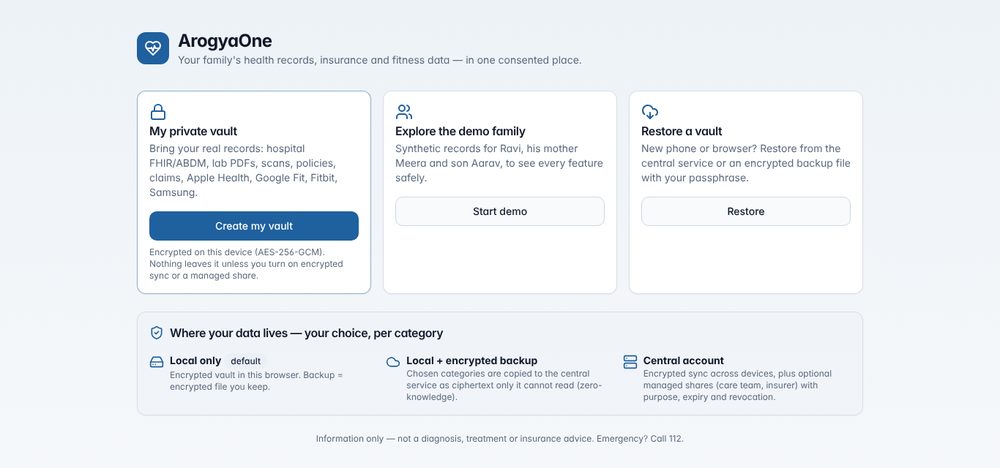
Option A: demo family.
- Open the app and choose Start demo.
- Work through the onboarding.
- Explore Home, Ask, Insurance and the Admission assistant.
Option B: your own (or sample) records.
- Open the app, choose Create my vault and enter a name and date of birth.
- Pick a passphrase and Local only, then save the recovery key.
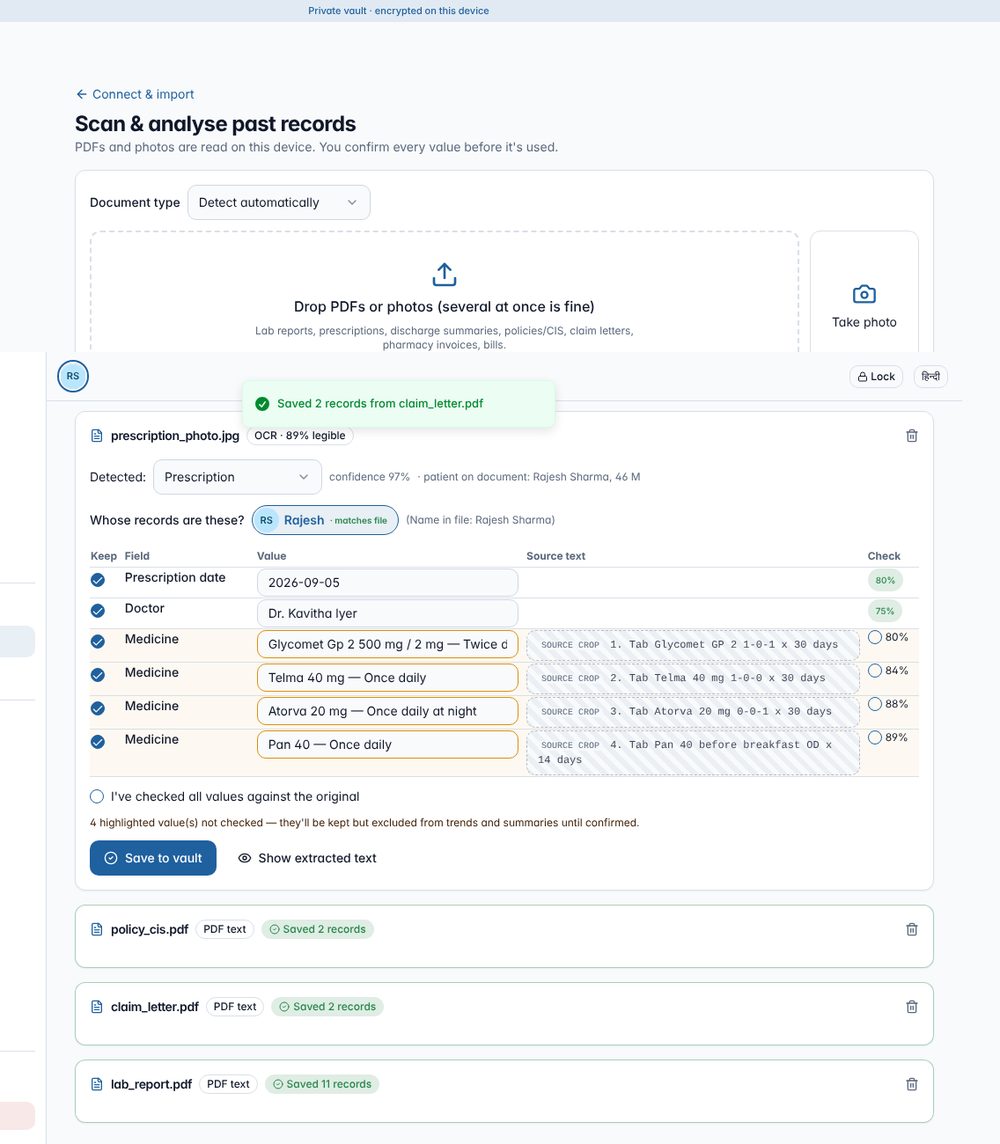
- Go to Connect & import → Scan documents and
drop
lab_report.pdf,policy_cis.pdf,claim_letter.pdfandprescription_photo.jpgfrom the sample files. Check the values, then save. - In Connect & import, import:
- Apple Health (
apple_export.zip) - FHIR (
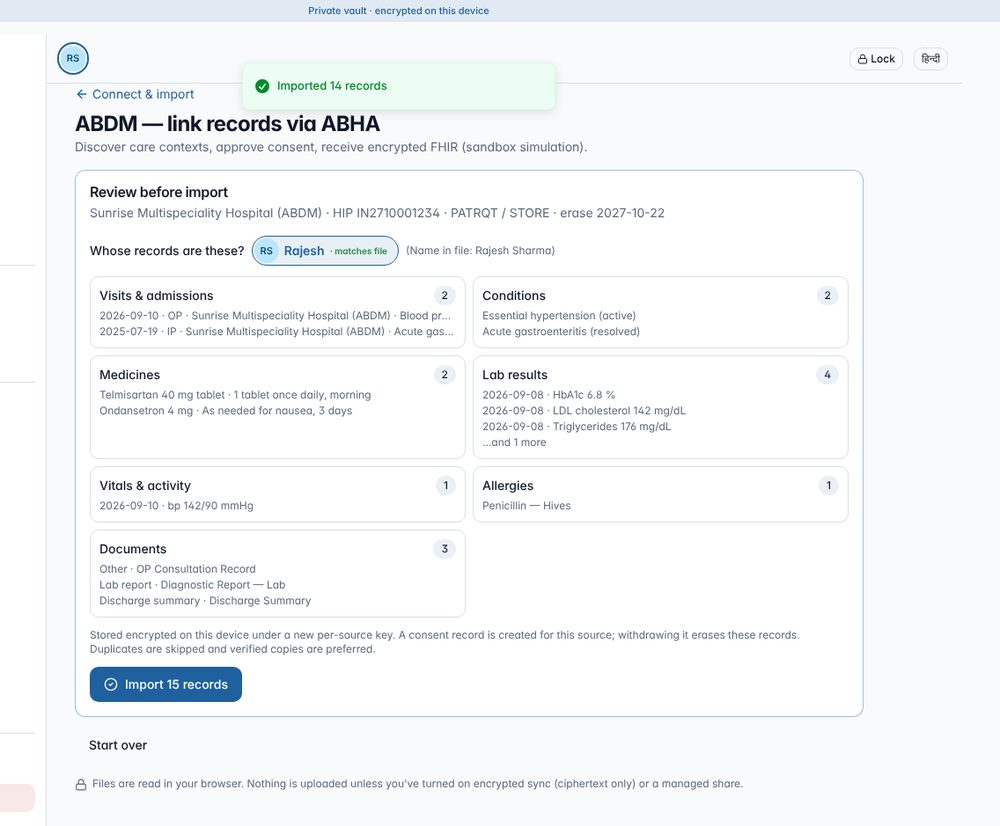
hospital_fhir.json) - ABDM (any 6-digit OTP)
- Apple Health (
- Open Analysis, Trends and Insurance.
- In Data & storage:
- switch to Central account and press Sync now;
- create a managed share;
- then open the Central service view.
- Lock, then unlock. Finally use Download encrypted backup.
Connect & import
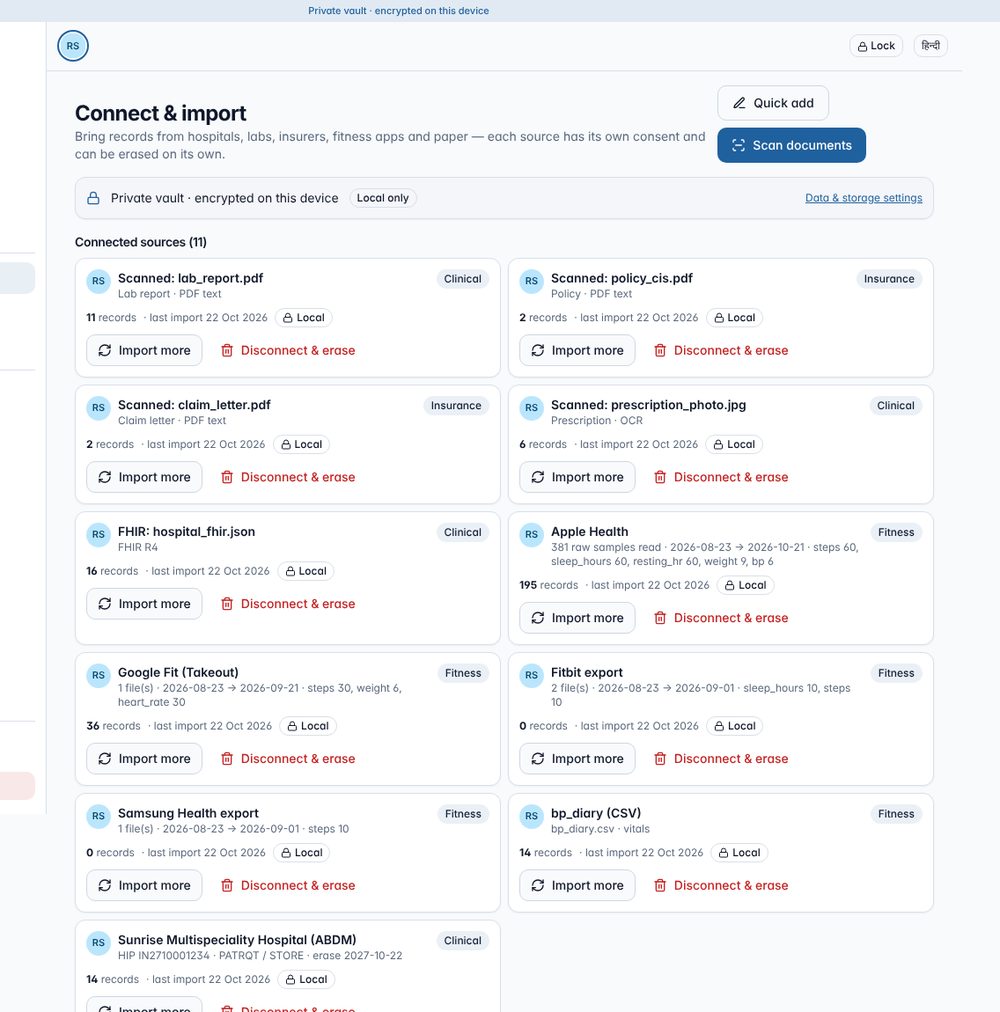
All parsing happens in the browser. Each import shows a preview, picks the right family member, removes duplicates (preferring verified copies) and creates its own consent and encryption key.
| Source | Status | How you get the file | What’s imported |
|---|---|---|---|
| Lab reports (PDF/photo) | ✅ Works | Lab email/WhatsApp PDF or a photo | ~45 common Indian tests → LOINC, lab-specific ranges, unit conversion (mmol/L, lakh/cumm, µmol/L) |
| Prescriptions | ✅ Works | Photo or PDF | Brand → molecule (starter Indian dictionary), strength, 1-0-1/OD/BD/TDS/HS/SOS, duration. Handwriting always flagged |
| Discharge summaries | ✅ Works | PDF/photo | Admission/discharge dates, hospital, diagnoses, medicines, labs |
| Policy schedule / CIS | ✅ Works | Insurer PDF | Sum insured, room rent, co-pay, initial/PED/specific/maternity waiting periods, exclusions, OPD, TPA, with the clause text kept |
| Claim letters | ✅ Works | TPA/insurer letter | Status, claimed/approved, deductions, denial reason and category |
| Bills & pharmacy invoices | ✅ Works | PDF/photo | Amount, date, category → spend |
| FHIR R4 files | ✅ Works | Hospital portal / PHR export | Patient, Encounter, Condition, Medication*, Observation, Allergy, Immunization, DiagnosticReport, DocumentReference/Binary (PDFs read), Composition |
| Insurer / NHCX FHIR | ✅ Works | Insurer/TPA/provider systems | Coverage, Claim, ClaimResponse, ExplanationOfBenefit |
| ABDM via ABHA | 🟡 Sandbox | ABHA address | Discovery → OTP → consent (PATRQT/STORE/dataEraseAt) → encrypted push → decrypt, with real ABDM crypto |
| Apple Health | ✅ Works | Health app → Export All Health Data | Streamed (multi-GB OK): daily steps (phone/watch de-duplicated), sleep, HR, resting HR, weight, BP, glucose, SpO2 |
| Google Fit / Fitbit / Samsung Health | ✅ Works | Takeout / account export / Samsung Download personal data | Daily steps, sleep, HR, weight, BP, glucose |
| Any CSV | ✅ Works | Any app export | Column mapping → vitals, labs, medicines or expenses |
| SMART on FHIR portals · insurer APIs · AA/DigiLocker · Health Connect live sync | ⏳ Planned | — | Need partnerships or registrations, or a native Android app |
Analysis of past records
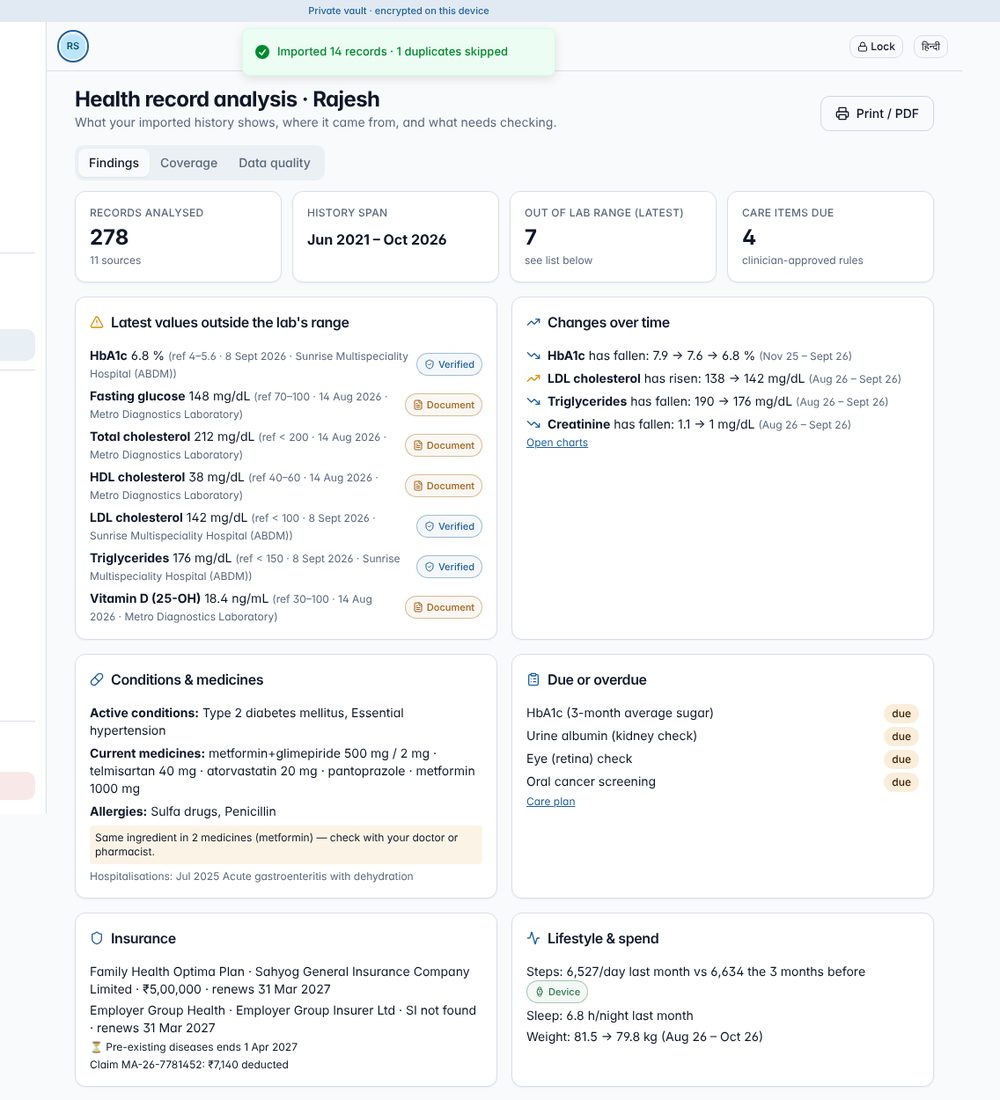
The Analysis page reads everything imported for the selected person. It has three tabs:
- Findings:
- latest values outside the lab’s own range;
- changes over time;
- conditions, medicines and allergies, including a duplicate-ingredient check;
- due or overdue checks;
- insurance: waiting periods, rejected claims, deductions;
- lifestyle and 12-month out-of-pocket spend.
- Coverage: records per year and per source, which shows gaps where records probably exist elsewhere.
- Data quality:
- duplicates linked to the more trusted copy;
- low-confidence scanned values awaiting confirmation (left out of trends until confirmed);
- conflicts;
- handwritten medicines to confirm.
Local or central, with consent
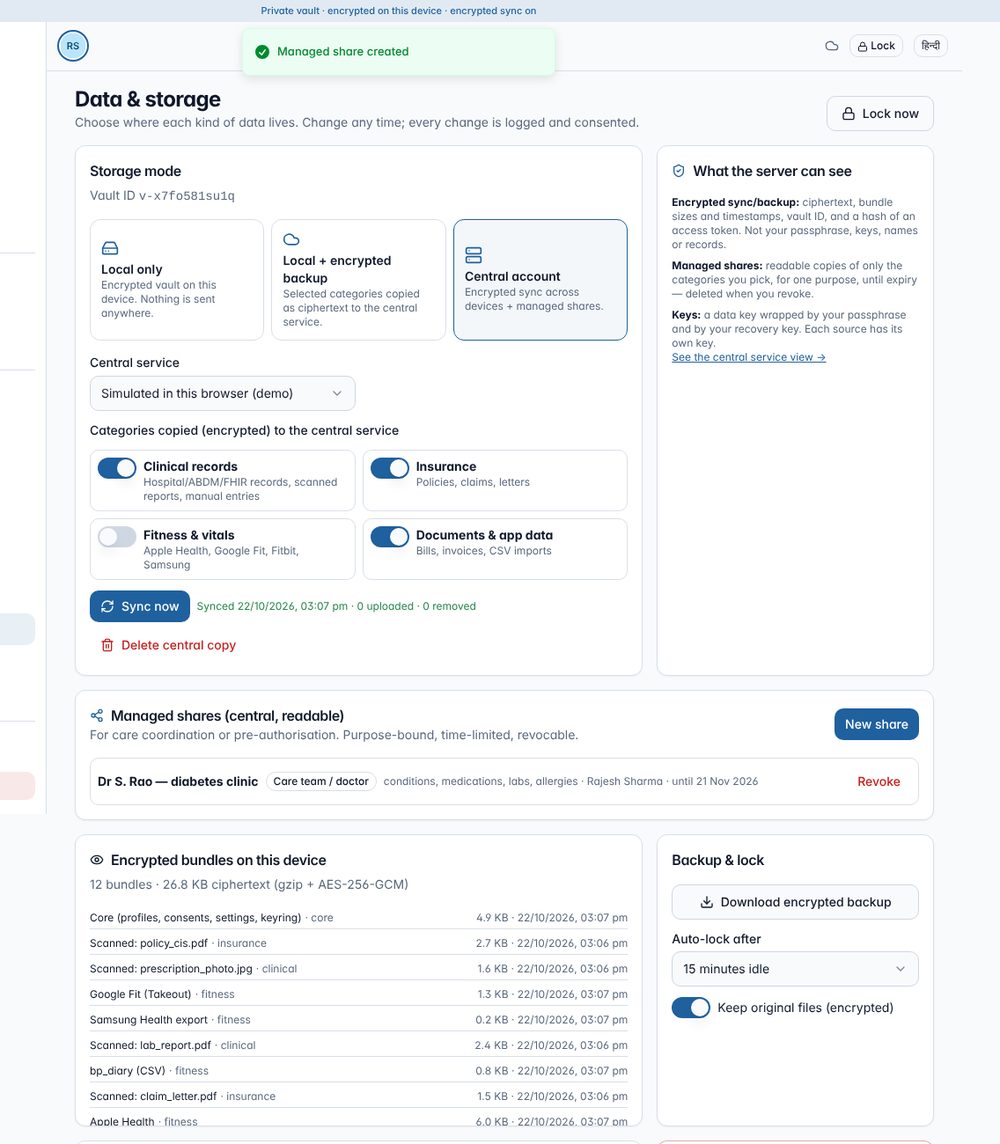
| Mode | Where data lives | Who can read it |
|---|---|---|
| Local only (default) | Encrypted vault in this browser; backups are encrypted files you keep | Only you |
| Local + encrypted backup | Plus ciphertext copies of the categories you choose | Only you (the server can’t decrypt) |
| Central account | Encrypted sync across devices + managed shares | You; a managed share is readable by its named recipient, for its purpose, until expiry |
The central copy is split into four categories: clinical, insurance, fitness and documents. You choose which go up. Turning a category off deletes its central copy on the next sync.
Key hierarchy (Web Crypto)
passphrase ─PBKDF2-SHA256 600k─► KEK ─┐
recovery key ─PBKDF2 100k────────► KEK ─┤ wrap
                                        ▼
                        data key (AES-256) ──► core bundle (profiles, consents, settings, keyring)
                                                      │
                     per-source key ──► source bundle + original files   ← erased = key destroyed (crypto-shredding)
central token = HKDF(data key) → server stores only SHA-256(token)
Consent records. Each of these has its own record, and every action is logged:
- platform purposes (P1–P12);
- each source (with ABDM purpose, HI types and erase date);
- each family profile (parental or caregiver);
- sync (P13);
- each managed share (P7, with purpose and expiry).
Withdrawing a source’s consent erases its records and destroys its key.
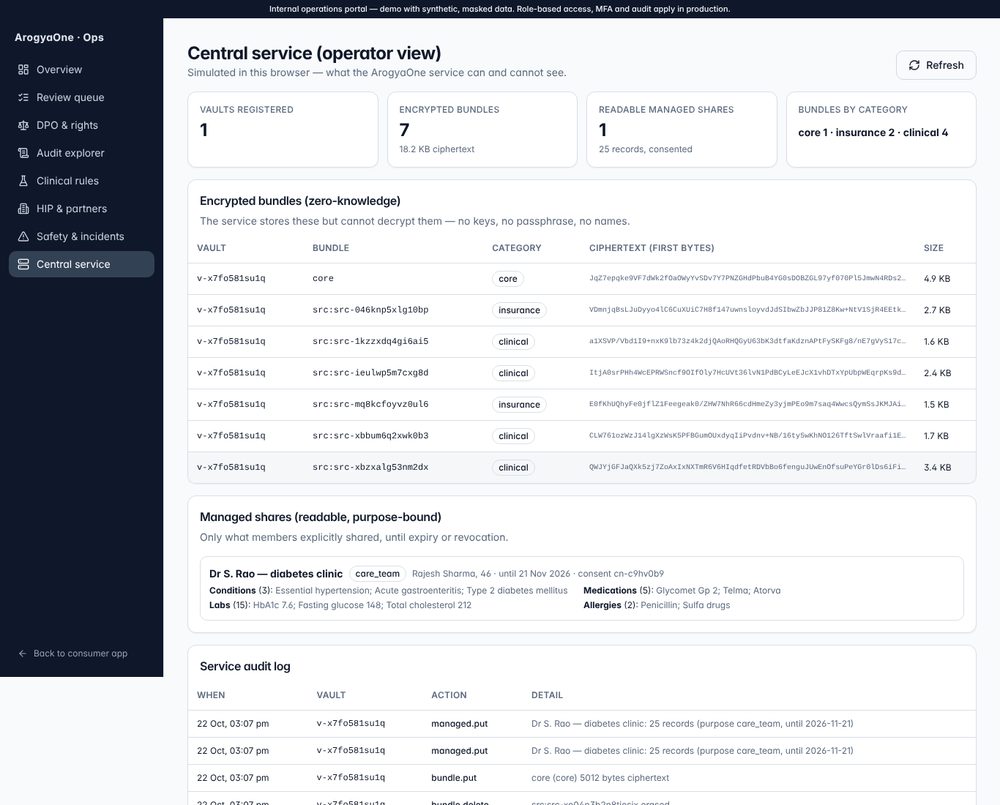
What the server can see.
- Can see: vault IDs, bundle sizes and timestamps, ciphertext, and consented managed shares.
- Cannot see: passphrases, keys, names, records or files.
Test evidence
| Suite | Result |
|---|---|
| ABDM encryption vs NHA’s reference implementation (BouncyCastle 1.78.1) | 13/13: shared secret, HIU decryption and HIP encryption byte-identical; JS-generated keys accepted by Java |
| Reference central service API | 19/19: auth, ciphertext-only storage, managed shares, expiry, ABDM push decryption, audit |
Vault end-to-end in a browser, GitHub Pages build (now served at
/health-aggregator/app/) |
39/39, no errors. Covers vault creation, scanning (incl. OCR, 4/4 medicines), all importers, analysis, lock/unlock, recovery key, no plaintext in browser storage, per-category sync, managed share, erase, backup, wipe and restore |
| Demo family regression (34 routes, desktop + mobile) | 0 errors |
Limitations and path to production
- ABDM live: register the server as an ABDM HIU and
PHR app (sandbox → WASA audit → production). The data-push decryption
endpoint is in
server/. - Central service: defaults to a simulation in the browser. The reference Node server in the source package shows the real API. Production needs India-region hosting, KMS, CERT-In logging and incident reporting.
- OCR accuracy:
- digital PDFs are near-exact;
- photos depend on quality;
- handwriting always needs confirmation;
- English only for now.
- Local storage: a local-only vault lives in one browser, so download encrypted backups.
- Before real users: clinical safety sign-off, a licensed drug database, validated LOINC mappings, and the legal opinions in the executive summary.
Downloads: source code (Lovable/GitHub, includes server and docs) · sample files