Add-ons & standalone tools
Miraiva v0.3 · incremental, separately consented modules and free single-page tools · 23 October 2026
Try them: Open the Add-ons hub in the app (demo: tap Start demo, then Turn on recommended) · Standalone tools · Download this catalogue as PDF or Word
Everything here runs in the browser. The add-ons work on the demo family or a private encrypted vault; the tools need no account and can’t make network requests. Not medical, tax, insurance or financial advice; figures marked VALIDATE must be checked against official sources.
1. Summary
This release turns recommendations from the earlier research report, wireframes and app sessions into working, separately consented modules. You can adopt them one at a time, without changing the core product.
| What | Count | Where |
|---|---|---|
| In-app add-ons: optional modules that work on the user’s own records (demo or private vault) | 11 | Miraiva → Add-ons (#/addons) |
| Standalone tools: single-page calculators and checklists that need no account and store nothing | 5 + hub | health-aggregator/app/tools/ and
apps/health-tools/ |
| Planned add-ons: need a partner, a licence or a native app | 13 | Listed in the app and in section 7 |
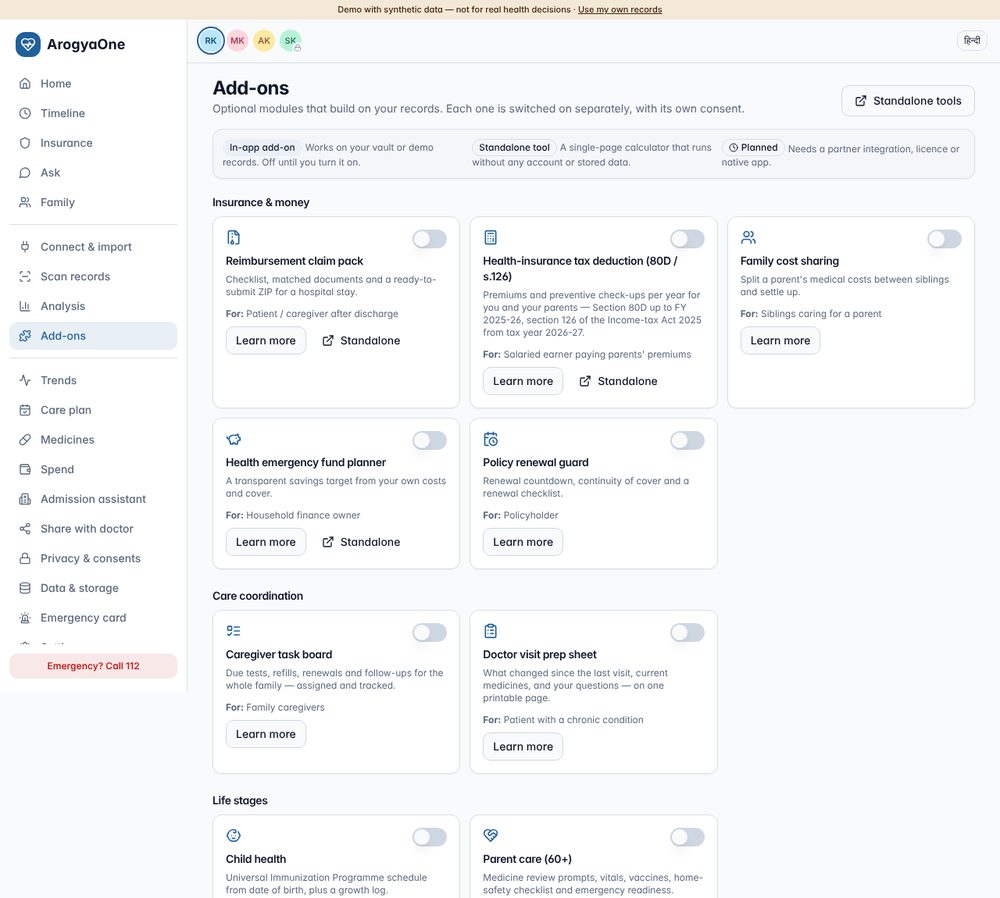
How the add-ons are built
- Off by default, one consent each. Turning an add-on
on creates its own consent record (
Add-on: <name>, purposeA-<id>). Turning it off withdraws that consent, and the user chooses whether to keep or erase what the add-on stored. - Read through the existing consent filters. An add-on sees only what the core app may show for that person: records whose source consent is active, family members the user can access, and confirmed (not low-confidence) scanned values.
- Nothing leaves the device. Packs (ZIP), letters and CSVs are built in the browser. The standalone tools carry a Content-Security-Policy that blocks every network request.
- Guardrails are built in. Every add-on shows its limits (“not tax advice”, “never stop a medicine”, “you submit the claim yourself”). Every regulatory figure is marked VALIDATE and listed in section 8.
What to do next
- Ship first (P1):
- Claim pack
- Important documents + emergency card
- Doctor visit prep
- Health-insurance tax deduction (80D / s.126)
- Caregiver task board
- Child health (after clinical sign-off of the schedule)
- Use the standalone tools for acquisition. They are free, shareable and private by design, and each links to its in-app add-on.
- Fix the open regulatory items before a public launch (section 8). The most important: the tax add-on is year-aware because income from 1 April 2026 falls under the Income-tax Act, 2025, where the health-insurance deduction is section 126, not 80D.
Test evidence (section 9)
| Suite | Result |
|---|---|
| Unit tests on add-on formulas | 13/13 |
| Add-ons end-to-end in demo | 70/70 |
| Add-ons on a private vault | 16/16 |
| Vault regression | 41/41 |
| Demo regression | 0 errors |
| Server | 19/19 |
2. How add-ons work
2.1 Principles
- Incremental: each add-on uses records the core app already holds. None needs a new connector or a new backend.
- Consent per purpose (DPDP): a new purpose gets a new consent, which is as easy to withdraw as to give. The add-on’s data is erasable on its own.
- Data minimisation:
- An add-on stores only what it needs: ticks, assignments, notes, growth entries, its document index.
- Clinical facts the user adds through an add-on (a vaccine dose, an important document) become ordinary records with provenance “Entered by you”.
- No advice, no selling:
- No insurance product comparisons or recommendations, no tax advice, no diagnosis or treatment changes.
- Suggestions are phrased as questions for the doctor or adviser.
- Works offline and in the private vault: add-on state is encrypted with the vault core and synced only as ciphertext.
2.2 Architecture (as built)
Add-on page (src/addons/pages/*)  ──>  AddonShell: consent gate · "needs" notices · guardrail
        │ reads via                          │ writes via
        ▼                                    ▼
computeHealth(store, personId)        updateAddonData(key, fn)   ──>  core.addonData (encrypted in vault core)
(consent-scoped selectors)            addManual / importBatch     ──>  records + files (per-source keys)
        │                             getFileBytes / deleteRecord
        ▼
Pure logic (src/addons/logic.ts) — unit-tested; mirrored by the standalone tools (public/tools/*)
Lifecycle
- Turn on: creates
cn-addon-<id>(status active) and writes the audit event “Add-on enabled”. - Turn off: sets the consent to withdrawn, with
either “keep its data” or “erase its data”. Erasing deletes the add-on’s
dataKeys. Records the user created stay until deleted or until their source consent is withdrawn. - Privacy & consents page: shows an Add-ons section with a switch for each add-on.
- Needs: some add-ons read through a core permission (“Understand my insurance”, “Summaries, trends & reminders”). If that permission is off, the add-on shows a notice instead of silently showing nothing.
2.3 Consent change shipped with v0.3
While testing the add-ons we found that the demo onboarding showed all optional permissions off, even though the text implied some were on. Pre-ticked consent is also weak evidence of a “clear affirmative action”. From v0.3:
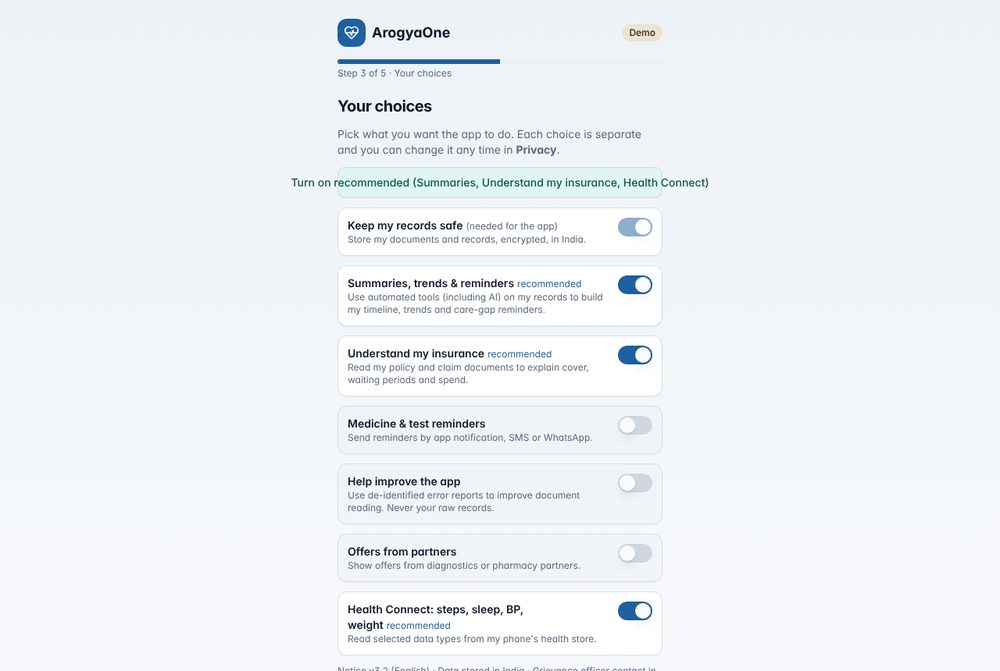
- Optional permissions start off in both demo onboarding and vault setup.
- A one-tap “Turn on recommended” button switches on Summaries, Insurance and Health Connect. “Help improve” and “Offers” are never part of “recommended”.
- Add-ons that depend on an off permission explain this.
3. Catalogue at a glance
| # | Add-on | Category | Persona | Core use case | Reads | Stores | Standalone twin | Priority |
|---|---|---|---|---|---|---|---|---|
| 1 | Reimbursement claim pack | Insurance & money | Patient / caregiver after discharge | Complete claim file with no missing documents | Stays, documents, bills, policy terms, claims | Checklist ticks, bills excluded | Claim checklist | P1 |
| 2 | Health-insurance tax deduction (80D / s.126) | Insurance & money | Salaried earner paying parents’ premiums | One deduction summary per year for the CA | Premiums, check-up bills, ages | Preventive ticks, “not paid by me” | Tax deduction estimator | P1 |
| 3 | Family cost sharing | Insurance & money | Siblings caring for a parent | Who paid what, who owes whom | Out-of-pocket bills of chosen people | Members, shares, payers, settlements | — | P3 |
| 4 | Health emergency fund planner | Insurance & money | Household finance owner | Transparent savings target | 12-month out-of-pocket spend, hospital bills, sum insured left, co-pay | Assumptions | Emergency fund planner | P3 |
| 5 | Policy renewal guard | Insurance & money | Policyholder | No lapse that resets waiting periods | Policies, renewal dates, waiting periods | Checklist ticks | — | P2 |
| 6 | Caregiver task board | Care coordination | Family caregivers | One list of what’s due and who’s doing it | Care gaps, refills, renewals, unconfirmed values, insurer queries | Manual tasks, status, assignee | — | P1 |
| 7 | Doctor visit prep sheet | Care coordination | Patient with a chronic condition | Walk in with what changed and the right questions | Labs, medicines, stays, device averages, due items | Concerns, questions, doctor | — | P1 |
| 8 | Second-opinion pack | Records & sharing | Patient seeking a second opinion | Organised file for a specialist | Selected records and original files | — (download only) | — | P2 |
| 9 | Important documents | Records & sharing | Everyone, especially elderly parents | Find the donor pledge or insurance card in an emergency | — | Document index (files encrypted in the vault) | — | P1 |
| 10 | Child health | Life stages | Parents | Which vaccines are due; growth log | Children’s profiles, immunisations | Growth entries | Vaccination schedule | P1* |
| 11 | Parent care (60+) | Life stages | Adult children of elderly parents | Medicine review prompts, vaccines, home safety, emergency readiness | Medicines, vitals, labs, immunisations, care gaps | Checklist ticks | — | P2 |
* Ships after clinical sign-off of the schedule and wording.
4. In-app add-ons — detail
Each entry gives: the user story, what the add-on does, data and consent, guardrails, acceptance criteria (covered by the automated tests) and how to try it in the demo.
4.1 Reimbursement claim pack (P1)
User story: “After a reimbursement admission, I want to know which papers I still need and hand over one complete pack, so the claim isn’t queried for missing documents.”
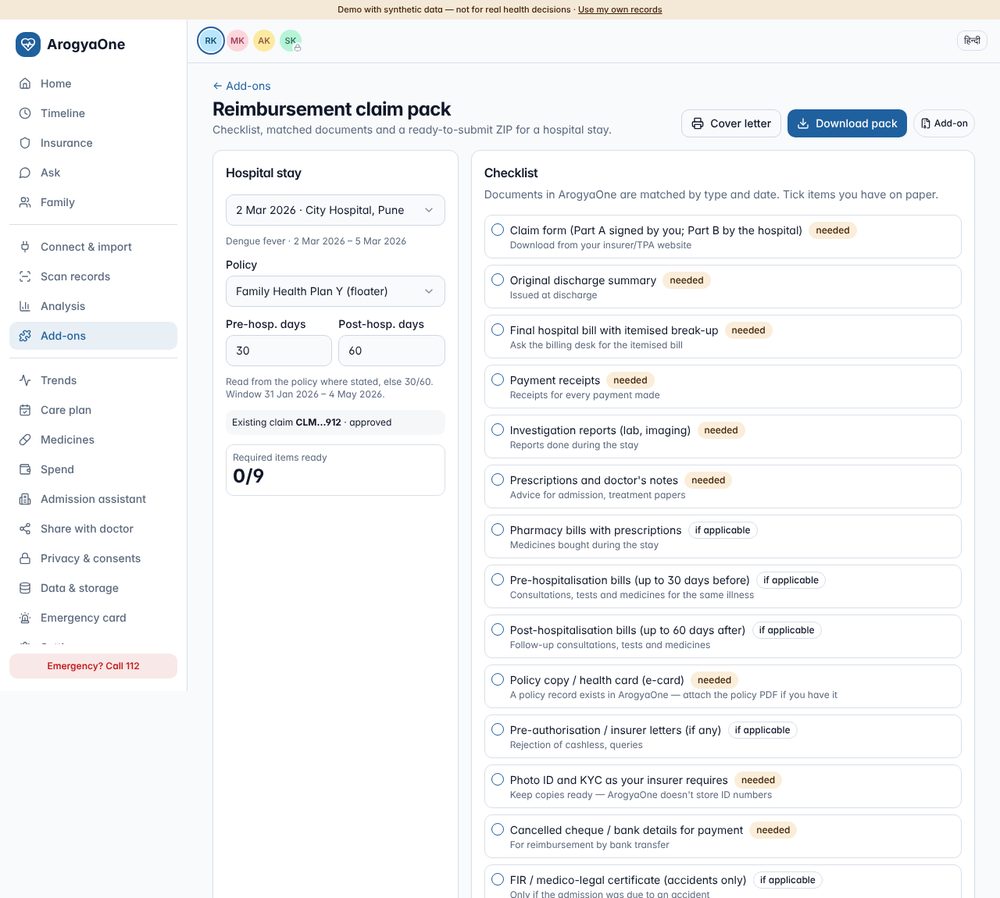
What it does:
- Picks the stay and the policy. The user picks a hospital stay (inpatient or day-care) and a policy. The pre- and post-hospitalisation windows are read from the policy text where stated (e.g. “30 days before / 60 days after”); otherwise they default to 30/60, and the user can edit them.
- Builds a 14-item checklist. Items include the claim form, discharge summary, itemised bill, receipts, investigations, prescriptions, pharmacy bills, pre/post bills, policy or e-card, insurer letters, KYC, bank details, and FIR/MLC for accidents. Documents already in Miraiva are matched by type and date window; the user ticks what they have on paper.
- Lists the bills in the claim window. Each bill has an include box, so regular medicines for an unrelated condition can be left out (pre/post bills count only for the same illness).
- Produces the pack:
- a printable cover letter;
- a ZIP containing the cover letter, the checklist,
claim-summary.jsonand the original files decrypted from the vault, with correct file extensions.
Data & consent: reads stays, documents, bills, policy and claim records. Stores ticks and excluded bills. Needs “Understand my insurance” for policy terms; without it the defaults apply.
Guardrails: the user submits the claim. Filing or chasing claims on someone’s behalf may need IRDAI review. Insurer document lists differ (VALIDATE).
Acceptance criteria (tested): 14 items; ZIP contains the cover letter, checklist and summary; unticking a bill lowers the total; in the vault, original PDFs are included byte-for-byte.
Try it: Demo → Add-ons → Claim pack → choose the stay → Download pack.
4.2 Health-insurance tax deduction — 80D / section 126 (P1)
User story: “At tax time I want one summary of premiums paid for my family and my parents, with receipts, to give my CA.”
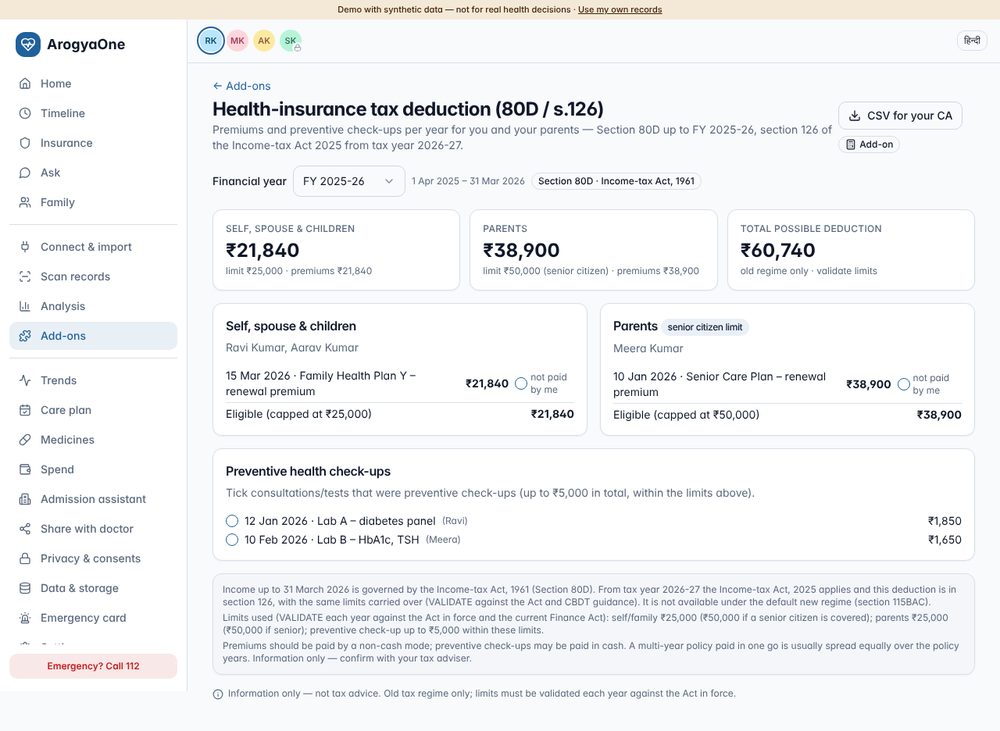
What it does:
- Groups people. Profiles are split into self/spouse/children and parents. Senior-citizen status is taken from date of birth at the end of the year.
- Totals each group:
- premiums (each can be marked “not paid by me”);
- preventive check-ups, which the user ticks;
- for an uninsured senior, medical expenditure.
- Applies the limits: ₹25,000, or ₹50,000 if a senior citizen, per group. Check-ups are capped at ₹5,000 in total within those limits.
- Is year-aware:
- FY 2025-26 and earlier are labelled Section 80D (Income-tax Act, 1961).
- Tax year 2026-27 onwards is labelled section 126 (Income-tax Act, 2025).
- Exports a CSV for the CA.
Data & consent: reads premium receipts and consultation/diagnostic bills for accessible profiles. Stores the preventive and “not paid by me” ticks.
Guardrails: information only. Old regime only: the deduction is not available under the default new regime (s.115BAC of the 1961 Act / s.202 of the 2025 Act). VALIDATE each year.
Acceptance criteria (tested):
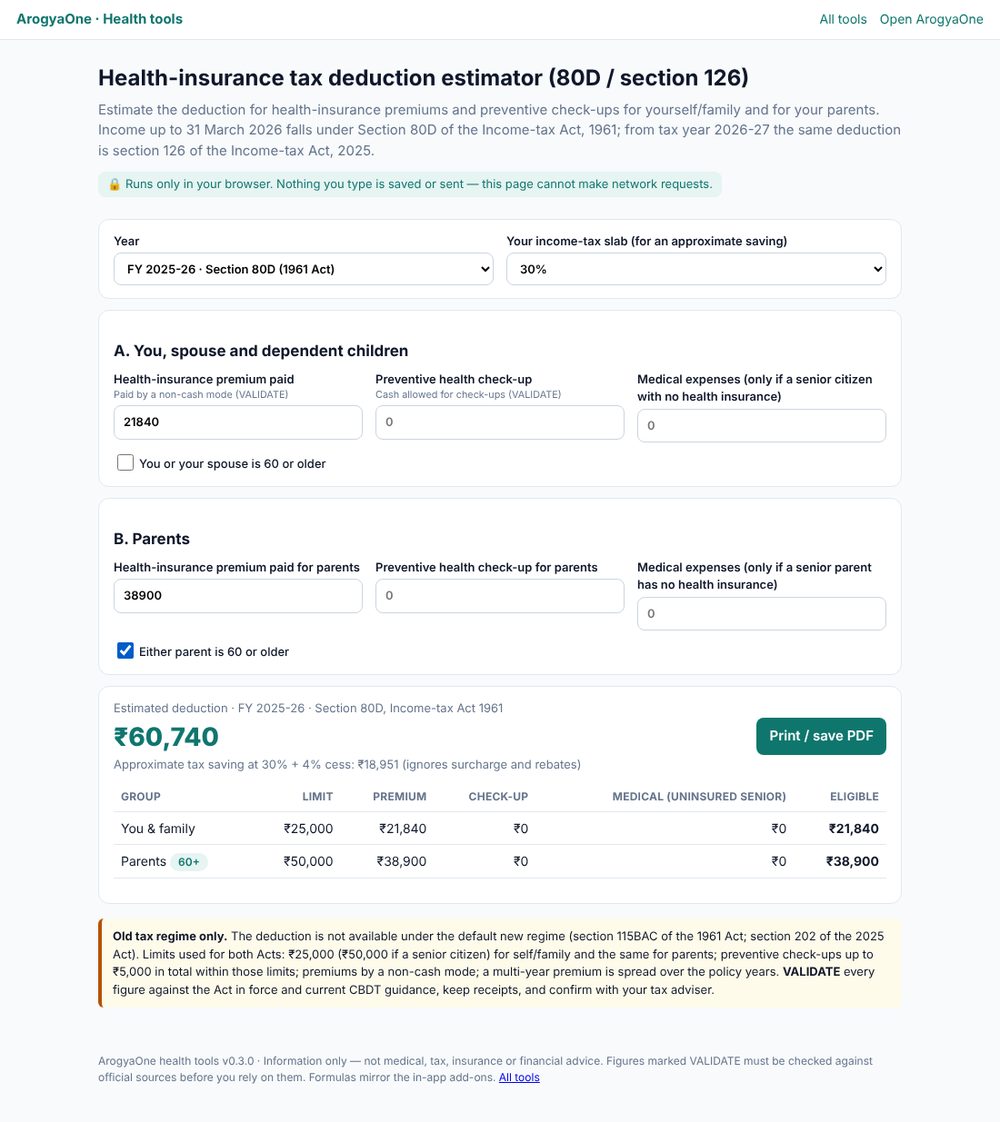
- The demo FY 2025-26 total is ₹60,740 (Ravi ₹21,840 self; Meera ₹38,900 as a senior parent).
- The caps and the shared ₹5,000 check-up cap are unit-tested.
- The year label switches to section 126 for 2026-27.
Try it: Demo → Add-ons → Health-insurance tax deduction.
4.3 Family cost sharing (P3)
User story: “My sister and I share our mother’s medical costs; I want to see who paid what and who owes whom.”
What it does:
- Lets the user choose whose costs to share and name the contributors with percentage shares.
- Records who paid each out-of-pocket bill.
- Records settlements.
- Computes balances and the minimum set of transfers to settle up.
Data & consent: reads the net out-of-pocket amounts (after reimbursement) of the chosen people. Stores members, shares, payers and settlements. Only the chosen people’s bills are shown.
Guardrails: amounts come from the user’s bills; no payment integration (UPI could be a later, separate consent).
Acceptance criteria (tested): demo shows the transfer “Anita → Ravi”; unit-tested balances and transfers, with settlements bringing the balance to zero.
4.4 Health emergency fund planner (P3)
User story: “I want to know how much to keep aside for health emergencies that insurance won’t cover.”
What it does: shows a transparent target made of four parts:
- 6 months of recurring out-of-pocket costs;
- one hospital stay — the higher of the worst past share and (co-pay + deductions) % of a typical stay;
- the cover shortfall for a major event, measured against the lowest remaining sum insured among the people included;
- planned or not-yet-covered treatments.
It also shows a monthly saving for a chosen number of months.
Guardrails: not financial or insurance advice; no products are suggested.
Acceptance criteria (tested): unit test (₹5,94,000 / ₹49,500 per month for the reference inputs); the standalone tool reproduces the same numbers.
4.5 Policy renewal guard (P2)
User story: “I don’t want a lapse to reset my waiting periods.”
What it does:
- Shows a renewal countdown for each policy.
- Shows “continuous cover since”, and the waiting periods earned through continuity with their end dates.
- Gives a renewal checklist: pay by a non-cash mode, review members and sum insured, nominee, disclosures, save the new schedule, and the portability window if moving insurer.
Guardrails: no comparisons or purchase prompts. Grace periods and portability rules come from IRDAI and the insurer (VALIDATE).
Acceptance criteria (tested): 3 demo policies; with the insurance permission off, a clear notice appears instead of “no policies”.
4.6 Caregiver task board (P1)
User story: “Several of us look after our parents; I want one list of what’s due and who’s doing it.”
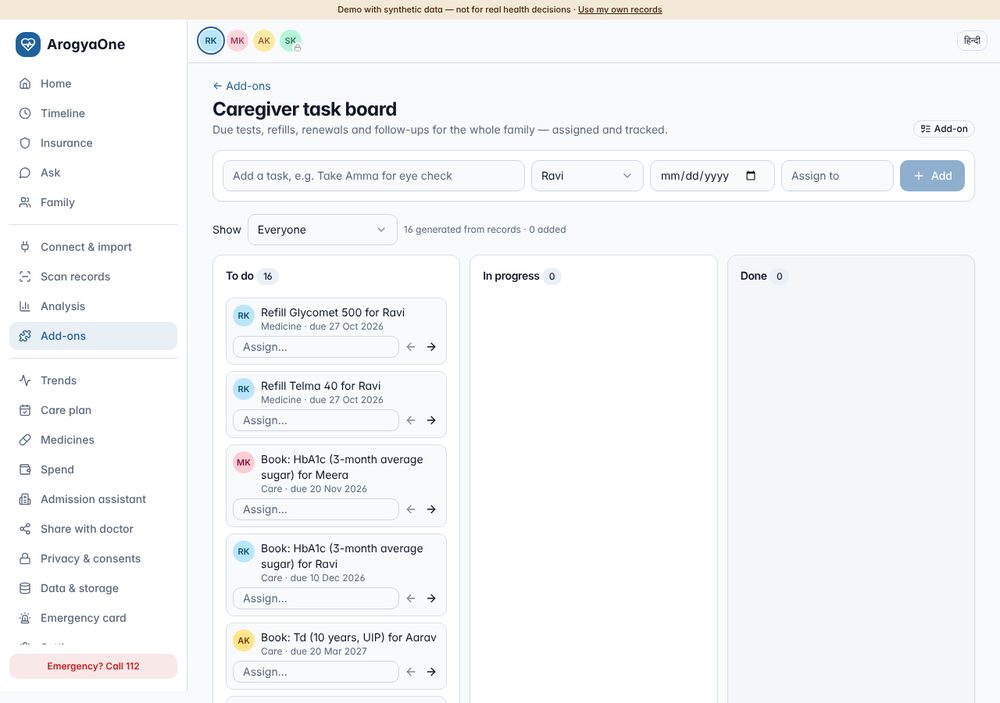
What it does:
- Auto-creates tasks for every accessible profile
from:
- due and overdue care reminders;
- estimated refills (from pharmacy records);
- medicines read from handwriting that need confirming;
- unclear scanned values;
- documents needing review;
- renewals within 60 days;
- insurer queries.
- Adds the user’s own tasks.
- Tracks work on a board: To do / In progress / Done, with an assignee, a person filter and deep links to the right screen.
Data & consent: stores manual tasks and per-task status and assignee. It reads only profiles the user can access.
Acceptance criteria (tested): 4 auto tasks in the demo; a manual task can be added and moved to “In progress”.
4.7 Doctor visit prep sheet (P1)
User story: “Consultations are short; I want to walk in with what changed and the questions I need answered.”
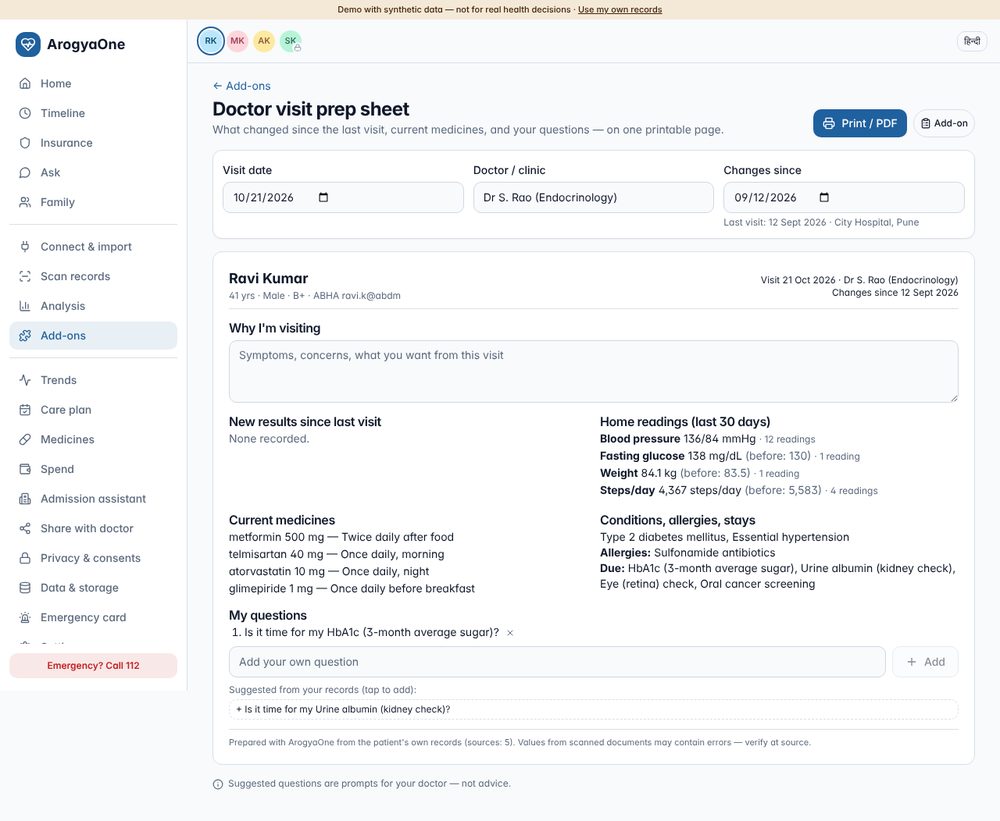
What it does: builds a one-page, printable sheet (the app’s navigation is hidden when printing) with:
- new results since the last visit, with direction and “outside lab range”;
- 30-day home-reading averages against the previous 90 days;
- current medicines, marking the new ones;
- conditions, allergies, stays and due items;
- the user’s concerns;
- suggested questions generated from the records (e.g. “My HbA1c went from 6.8 to 7.4 — what does this mean for my treatment?”, or “Two of my medicines contain paracetamol — is that intended?”). The user can add their own questions.
Guardrails: questions are prompts for the doctor, not advice. Scanned values carry a “verify at source” footer.
Acceptance criteria (tested): the sheet renders with suggested questions; in the vault it shows the FHIR-imported HbA1c and metformin.
4.8 Second-opinion pack (P2)
User story: “Before surgery I want a second opinion and need to send a complete, organised file.”
What it does:
- Lets the user focus on a condition (only related lab tests are kept), pick a date range and choose the categories.
- Builds a ZIP containing:
00-summary.html, a readable summary with sources;fhir-bundle.json, for hospital systems;documents/, the original files decrypted from the vault.
Guardrails: the pack is created on the device. The user shares it only with people they choose, or uses a time-bound share link instead.
Acceptance criteria (tested): demo ZIP contains the
summary and FHIR bundle; in the vault, 2 original PDFs are included
(%PDF- verified) and the bundle includes HbA1c 7.9.
4.9 Important documents (P1)
User story: “In an emergency my family must be able to find my organ-donor pledge and insurance card quickly.”
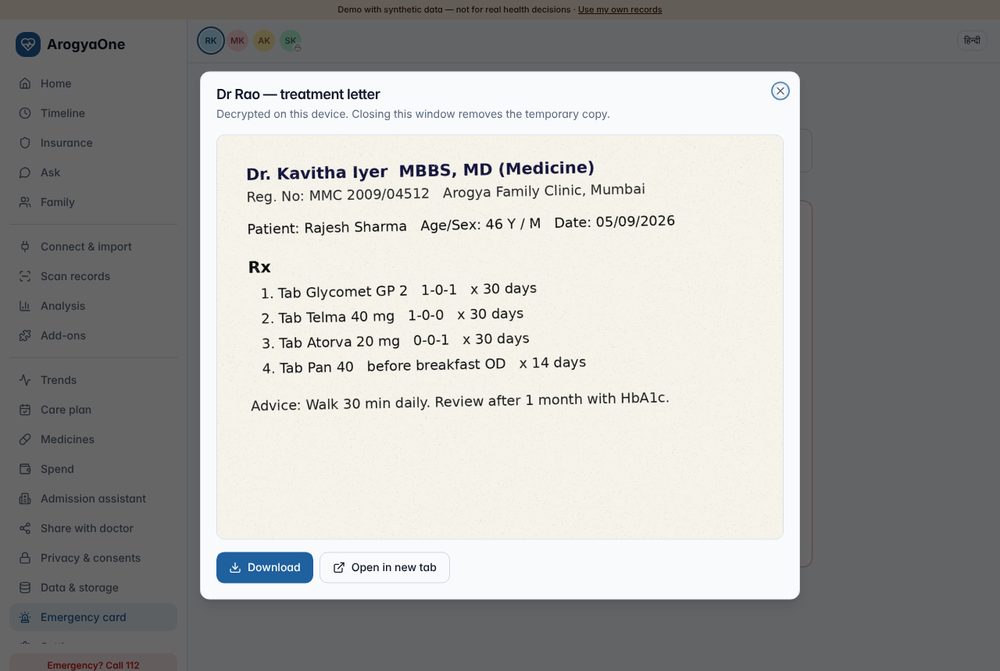
What it does:
- Stores the document types families most often can’t find:
- organ-donor pledge
- advance directive or living will
- disability certificate / UDID
- blood group report
- insurance e-card
- ABHA card
- doctor’s letters for implants
- Always keeps the original, encrypted in the vault, even if “keep original files” is off.
- Lets the user flag documents to appear on the emergency card.
- Opens files in an in-app viewer (no pop-ups to be blocked), with Download and “Open in new tab”.
- Shows a checklist of the document types that are still missing.
Guardrails: advance directives have legal requirements (Supreme Court guidelines); the app only stores the document — check with a lawyer.
Acceptance criteria (tested):
- Upload works, and the document appears on the emergency card.
- The viewer download is the original PDF.
- Vault behaviour:
- the note text is not found in plaintext in IndexedDB;
- the document survives lock/unlock;
- deleting it removes the encrypted file.
4.10 Child health (P1 after clinical sign-off)
User story: “I want to know which vaccines are due and keep my child’s height and weight in one place.”
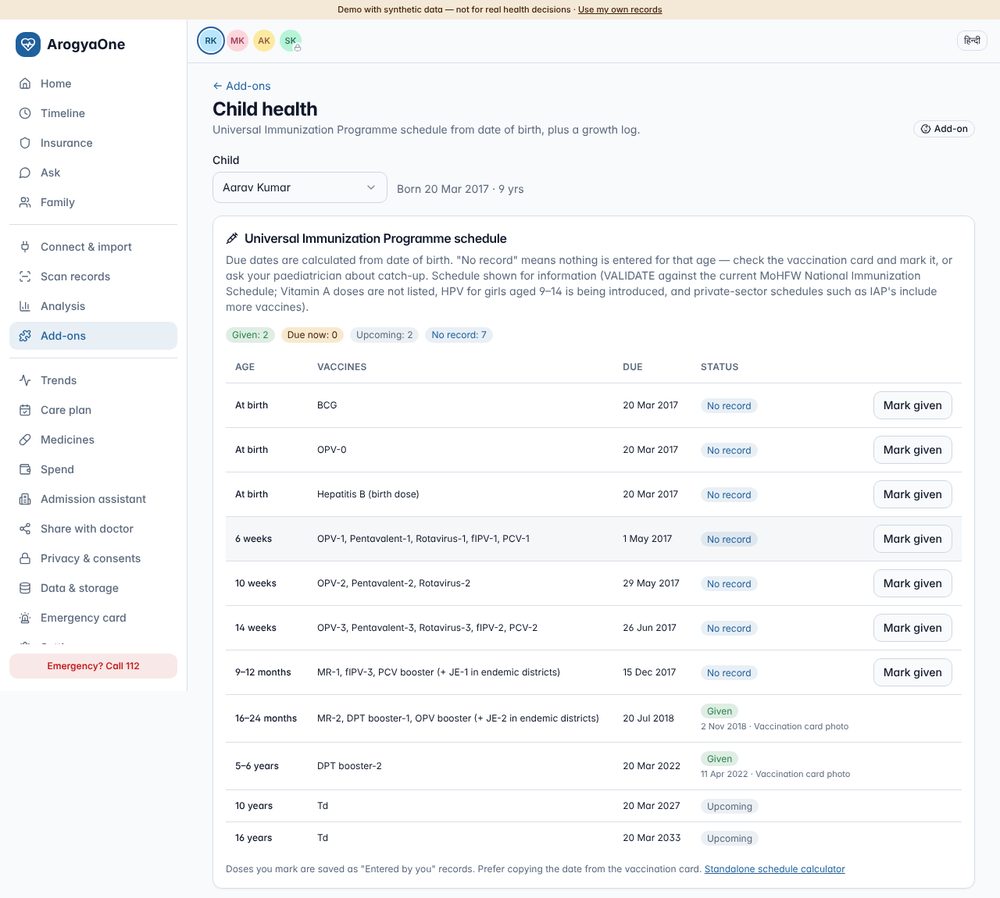
What it does:
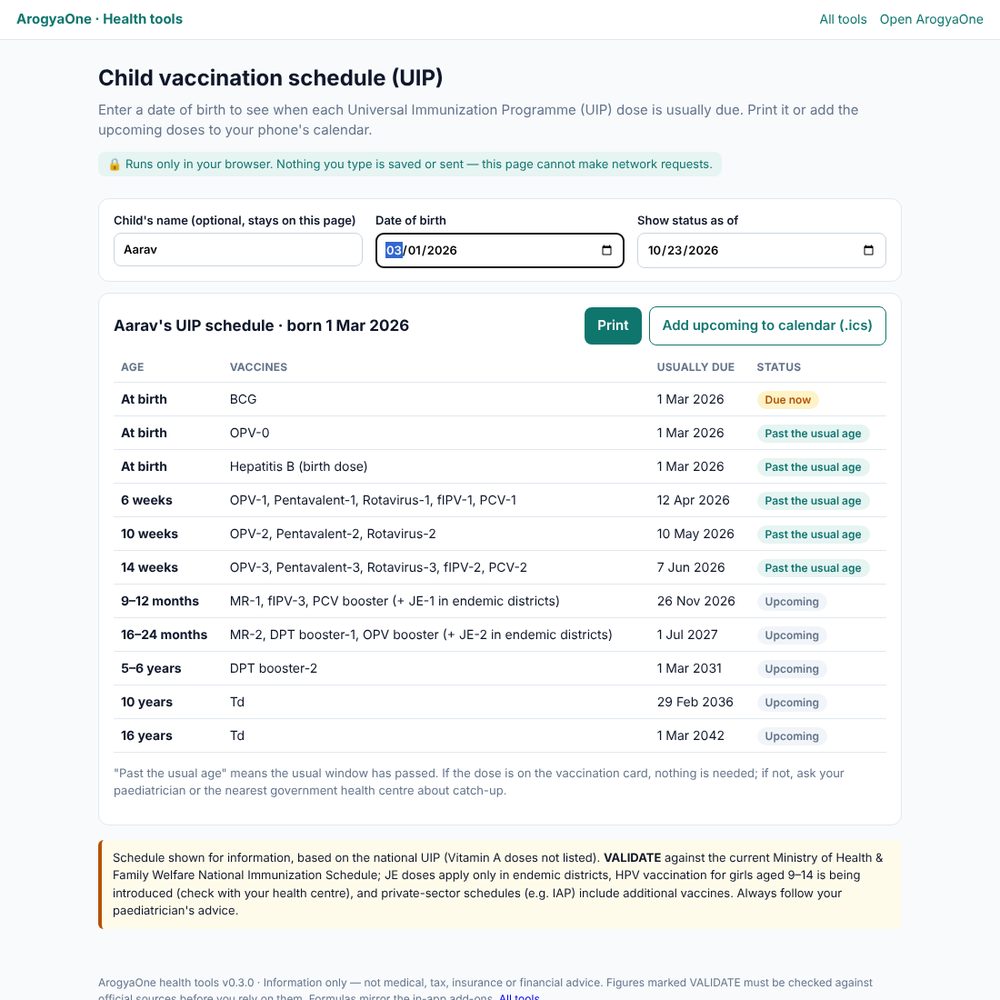
- Shows the UIP schedule calculated from date of birth, from birth doses to Td at 16 years. The 9-month visit lists MR-1, fIPV-3 and the PCV booster.
- Gives each dose a status:
- Given (with source)
- Due now
- Upcoming
- No record: past the usual age with nothing entered. It prompts the parent to check the card or ask about catch-up and never says “missed”.
- “Mark given” records a dose with its date, provenance “Entered by you”.
- Keeps a growth log with a chart and BMI. It notes that child BMI must be read against age- and sex-specific charts.
Data & consent: needs a child profile created with parental consent. The vaccine record is clinical; the growth log is add-on data that can be erased.
Guardrails: schedule shown for information; JE applies only in endemic districts; HPV for girls aged 9–14 is being introduced; private (IAP) schedules include more vaccines (VALIDATE).
Acceptance criteria (tested):
- 11 rows; the demo’s MR-2 and DPT booster-2 show as given.
- Marking a dose updates its status; every dose marked through the add-on matches only its own row.
- Turning the add-on off and erasing removes the growth log but keeps the vaccine record.
4.11 Parent care, 60+ (P2)
User story: “My mother takes several medicines; I want to spot duplicates, keep vaccines up to date and make her home safer.”
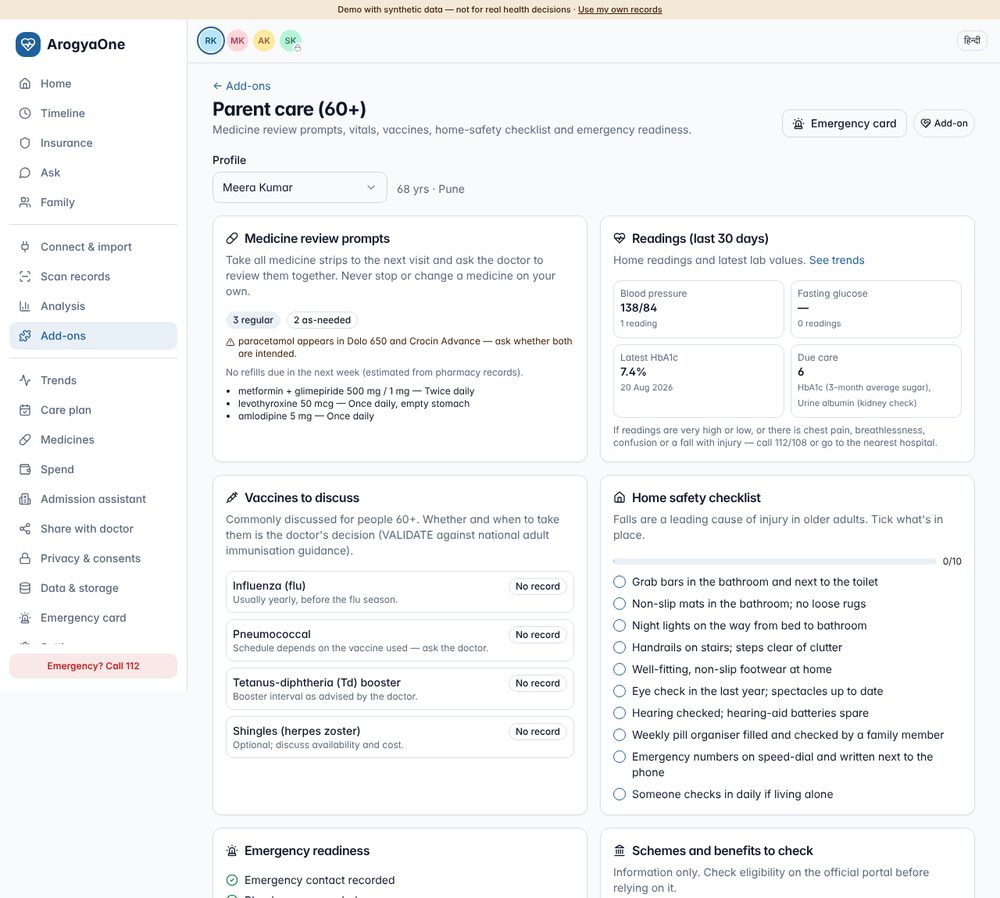
What it does:
- Medicine review prompts:
- regular vs as-needed medicines;
- a flag at 5 or more regular medicines;
- the same ingredient in two products;
- medicines still to confirm;
- refill estimates.
- The prompts encourage a “take all strips to the visit” review and say never to stop a medicine.
- Readings: 30-day BP and fasting glucose, latest HbA1c, due care, and when to call 112/108.
- Vaccines to discuss: influenza (yearly), pneumococcal, Td, zoster.
- Home safety: a 10-item falls-prevention checklist.
- Emergency readiness: contact, blood group, allergies, ABHA, policy, and documents on the emergency card.
- Schemes to check: PM-JAY for people aged 70+ (Ayushman Vay Vandana card), the senior tax-deduction limit, and CGHS or state pensioner schemes.
Guardrails: prompts to discuss with a doctor; scheme details must be checked on official portals.
Acceptance criteria (tested):
- Meera (68) is selected automatically.
- The duplicate paracetamol is flagged.
- Ticking 2 safety items shows 2/10, and this persists after a reload.
- 4 vaccines are listed.
- A vault with no 60+ profile shows an empty state.
5. Standalone tools
Five single-file HTML tools and a hub. They need no account
and no records, and a Content-Security-Policy
(default-src 'none') prevents any network
request, which the tests verify. Each tool links to the
matching in-app add-on.
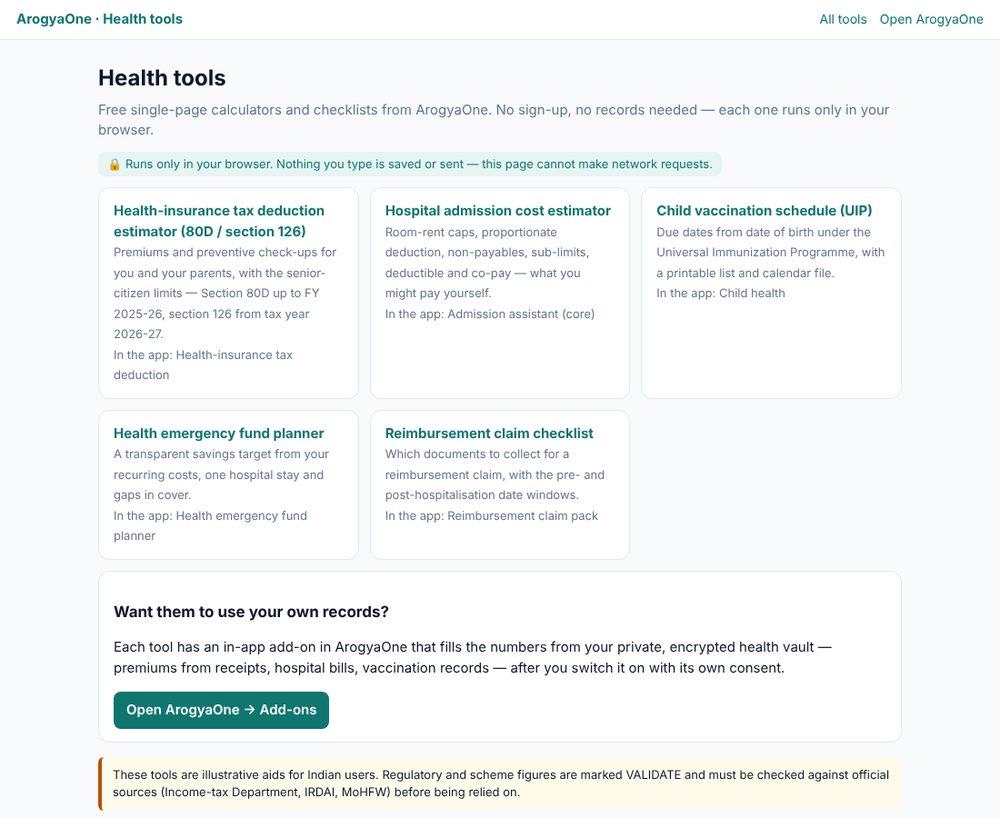
| Tool | Inputs | Output | Formula source |
|---|---|---|---|
Health-insurance tax deduction estimator
(tax-80d.html) |
Year; premiums, check-ups and uninsured-senior medical costs for self and for parents; senior flags; tax slab | Eligible amount per group, total, approximate saving at the chosen slab plus 4% cess; Act and section for the year | tax80d(), taxLaw() |
Hospital admission cost estimator
(admission-estimator.html) |
Bill, days, chosen room rent; room eligibility, non-payables %, sub-limit, deductible, co-pay, sum insured left | What the policy may pay, what you may pay, line-by-line deductions incl. proportionate deduction; tip on room choice | Mirrors the Admission assistant |
Child vaccination schedule (vaccine-schedule.html) |
Date of birth, “as of” date | UIP schedule with statuses; print; .ics calendar for upcoming doses | UIP, uipStatus() |
Health emergency fund planner
(emergency-fund.html) |
Recurring costs, worst past share, typical stay, co-pay, deductions, major event, lowest sum insured left, planned treatments, months | Target, monthly saving, breakdown | fundPlan() |
Reimbursement claim checklist
(claim-checklist.html) |
Admission/discharge dates, pre/post days, submission window, accident / cashless denied / outside pharmacy | Checklist with date windows, ready count, submit-by date; print | claimPack() items |
Distribution recommendations:
- Publish the tools as open pages
(e.g.
kalilurrahman.github.io/apps/health-tools/). Searches like “80D calculator”, “vaccination schedule from date of birth” and “claim documents checklist” are a low-cost acquisition channel. - Make sharing easy (WhatsApp-friendly): every result can be printed or saved as PDF. A later version could add a “Share result” button that shares only text the user chooses, never data.
- Partner embedding. Employers, TPAs and hospitals can link to or self-host the tools without any data-sharing agreement, because nothing is collected.
- Keep them honest: they show the same VALIDATE notes and disclaimers as the app, and their formulas are covered by the same tests.
6. Recommendations and prioritisation
6.1 Value × effort (no timelines)
| Add-on | User value | India fit | Build effort beyond v0.3 | Regulatory/clinical risk | Recommendation |
|---|---|---|---|---|---|
| Claim pack | High (reimbursement pain) | Very high | Low: insurer-specific checklists | Low–medium (no filing on behalf) | P1: validate with 3–5 insurer/TPA document lists |
| Important documents + emergency card | High (trust, emergencies) | High (family decisions) | Low: QR break-glass needs a backend | Low | P1 |
| Visit prep | High for chronic care | High (short consultations) | Low: Hindi output | Low | P1 |
| Tax deduction (80D / s.126) | Seasonal, high | Very high (parents’ premiums) | Low: keep the year table current | Medium (tax advice) | P1: annual legal review |
| Caregiver task board | High retention | Very high (joint families) | Medium: shared boards need a backend and caregiver accounts | Low | P1 (single device), P2 (shared) |
| Child health | High for parents | High | Low: IAP option, Vitamin A | Medium: clinical sign-off | P1 after sign-off |
| Parent care (60+) | High | Very high | Medium: clinician-reviewed rules, Hindi | Medium | P2 |
| Second-opinion pack | Medium | Medium | Low | Low | P2 |
| Renewal guard | Medium | High | Low | Medium (distribution optics) | P2: keep strictly non-commercial |
| Emergency fund | Medium | Medium | Low | Medium (financial advice optics) | P3 |
| Cost split | Niche, sticky | Medium | Low: UPI deep link with consent | Low | P3 |
6.2 Suggested order of investment (by dependency, not dates)
- Validate and polish P1:
- clinical sign-off of the child schedule and the parent-care prompts;
- legal review of the tax year table and the claim-pack wording;
- Hindi strings for all add-ons.
- Shared family features:
- caregiver accounts with per-person grants (already modelled);
- a shared task board and shared important documents through the encrypted sync service;
- each family member keeps control of their own data.
- Partner-backed add-ons:
- DigiLocker documents into Important documents;
- WhatsApp reminders (links only, no health data in messages);
- insurer/TPA claim status.
- Native capabilities:
- Health Connect live sync (Android);
- passkey unlock;
- offline PWA.
6.3 Success metrics per add-on
| Add-on | Primary metric | Guardrail metric |
|---|---|---|
| Claim pack | % of packs downloaded per reimbursement stay; self-reported “claim queried for missing documents” | Support tickets about wrong document matches |
| Tax deduction | Users exporting the CSV in tax season; tool → app conversion | Reported calculation disputes |
| Task board | Weekly active caregivers; tasks moved to Done | Notification opt-outs |
| Visit prep | Sheets printed or saved before a visit | “Question not relevant” feedback |
| Important documents | Users with ≥1 document on the emergency card | Deletion within 7 days (trust signal) |
| Child health | Doses marked from the card; ICS downloads | Clinical-safety incidents (target 0) |
| Parent care | Safety checklist completion; flagged duplicates reviewed | Users stopping a medicine because of the app (target 0; monitored through feedback) |
| All | Activation (turned on ÷ eligible users) | Turn off & erase rate: a high rate means low trust or value |
6.4 Validation experiments
| Question | Experiment |
|---|---|
| Does the claim pack reduce document queries? | Pilot with 50–100 reimbursement claims; compare the query rate with a matched group; collect insurer letters through scanning. |
| Is the UIP view correct and understood? | Paediatrician review of 20 synthetic children (edge cases: preterm, catch-up, JE districts); usability test with 10 parents, including Hindi speakers. |
| Do caregivers use a shared board? | Concierge pilot with 20 families (2–4 caregivers each) using a shared demo vault; measure weekly actions per caregiver. |
| Do standalone tools convert? | Publish the tools; measure tool → app clicks (counted only on the app side, since the tools make no requests) and app activation of the matching add-on. |
| Are visit-prep questions useful? | Clinician panel rates 50 generated sheets for relevance and safety; patients rate usefulness after the visit. |
7. Planned add-ons
| Add-on | Type | Why | Needs / dependencies | Main risk | Recommendation |
|---|---|---|---|---|---|
| DigiLocker documents | Integration | Pull policies and certificates the user already holds | DigiLocker requester onboarding; consent per document (VALIDATE which health/insurance documents are available) | Partner approval | Partner, P2 |
| WhatsApp assistant | Integration | Forward reports, get reminders where users already are | WhatsApp Business Platform via a BSP, template approval, opt-in records, processing in India | PHI in a third-party channel → send links/alerts only | Partner, P2 |
| Voice/IVR for elderly parents | Integration | Reminders and consent confirmation without a smartphone | IVR provider; Indian-language TTS (e.g. Bhashini); DLT registration | Consent by voice must be verifiable | Partner, P3 |
| Treatment reference prices | In-app | Compare a hospital estimate with published package rates (PM-JAY HBP / CGHS) | Official rate lists, kept current; “reference only” labelling | Misleading comparisons | Build with official data, P2 |
| Generic medicine savings | In-app | Molecule-level alternatives (e.g. Jan Aushadhi) for recurring medicines | Official price list + licensed brand→molecule database; “ask your doctor before switching” | Substitution safety | Licence + build, P2 |
| Women’s health tracker | In-app | Cycle, PCOS and thyroid logs with reminders | On-device storage only by default; excluded from family views and shares; clinical review | Very sensitive data | Build, P2 |
| Mental wellbeing check-ins | In-app | Mood and validated screeners with crisis routing | Clinical safety sign-off, instrument licensing, Tele-MANAS routing, separate consent | Crisis handling | Build with clinical partner, P3 |
| Nutrition log (Indian foods) | In-app | Diet tracking for diabetes and weight | IFCT-based dish database (licence VALIDATE), dietitian-curated portions | Data quality | Licence, P3 |
| Health Connect live sync | Integration | Daily sync from wearables, BP monitors and glucometers | Native Android app (Health Connect is on-device only); Play health-apps declaration | Native app effort | Build, P2 |
| Clinician portal for managed shares | Integration | Doctors open a managed share securely and see updates | Clinician login (HPR verification), per-view audit, member notifications | Account security | Build, P2 |
| Live claim status | Integration | Claim events pushed from insurer/TPA instead of letters | Insurer/TPA partnerships, member consent; NHCX is payer↔︎provider today | Dependency on partners | Partner, P3 |
| Hindi & regional-language scanning | In-app | Read reports printed in Indian languages | Tesseract language data (e.g. hin) under
/ocr, dictionaries per language |
OCR accuracy | Build, P1 (low cost) |
| Passkey / fingerprint unlock | In-app | Easier, phishing-resistant vault unlock | WebAuthn PRF support (uneven across browsers); passphrase fallback | Recovery complexity | Build, P2 |
8. Regulatory and clinical validation list (add-ons)
Every item below appears in the product as VALIDATE and must be checked by the named owner before a public launch.
| # | Item | Used in | Assumption in v0.3 | Check against | Owner |
|---|---|---|---|---|---|
| 1 | Which Act and section apply to which year | Tax add-on, tool | Up to FY 2025-26: Income-tax Act 1961, s.80D. From tax year 2026-27 (1 April 2026): Income-tax Act 2025, s.126. Not available in the default new regime (s.115BAC / s.202). | Income-tax Act 2025 text; CBDT; incometaxindia.gov.in | Tax counsel |
| 2 | Deduction limits | Tax add-on, tool | ₹25,000 (₹50,000 senior) self/family; same for parents; ₹5,000 check-ups within limits; non-cash premiums; multi-year premiums apportioned | As above | Tax counsel |
| 3 | UIP schedule | Child health, tool | Birth: BCG, OPV-0, Hep B · 6/10/14 weeks: OPV, Penta, Rota, fIPV (6, 14 wks), PCV (6, 14 wks) · 9 months: MR-1, fIPV-3, PCV booster (+ JE-1) · 16–24 months: MR-2, DPT B1, OPV booster (+ JE-2) · 5–6 y DPT B2 · Td 10 y and 16 y. Vitamin A not listed. HPV for girls 9–14 being introduced. | MoHFW National Immunization Schedule (mohfw.gov.in) | Paediatric lead |
| 4 | Adult vaccines 60+ | Parent care | Influenza yearly; pneumococcal; Td; zoster — all “discuss with the doctor” | National adult immunisation guidance | Clinical lead |
| 5 | PM-JAY for people aged 70+ | Parent care | Vay Vandana card regardless of income; up to ₹5 lakh/year, shared with a spouse who is also 70+; beneficiary.nha.gov.in; helpline 14555 | NHA / PIB | Product + legal |
| 6 | Claim documents, pre/post windows, submission time limits | Claim pack, checklist tool | Standard list; 30/60 days by default; ~30 days to submit | IRDAI health master circular; policy wordings; 3–5 insurer/TPA lists | Insurance SME |
| 7 | Non-payables, proportionate deduction | Admission estimator | 5% non-payables by default; proportionate deduction when the room exceeds eligibility | IRDAI guidance on non-payables; policy wordings | Insurance SME |
| 8 | Grace period and portability | Renewal guard | “Check with insurer” only | IRDAI master circular | Insurance SME |
| 9 | Not acting as an insurance intermediary | Renewal guard, fund planner, tools | No product comparison, recommendation or lead generation | IRDAI regulations for intermediaries / web aggregators | Legal |
| 10 | Advance directives | Important documents | Store only; legal requirements set by Supreme Court guidelines (2018, modified 2023) | Judgment text; lawyer | Legal |
| 11 | Organ donation pledge, UDID | Important documents | Store only; issuing bodies NOTTO / UDID portal | Official portals | Product |
| 12 | Children’s data | Child health | Parental consent at profile creation; no tracking or ads | DPDP Act s.9 and DPDP Rules 2025 (verifiable parental consent) | DPO |
| 13 | Emergency numbers | Emergency, parent care | 112, 108, Tele-MANAS 14416 | State-wise verification | Product |
9. Test evidence (v0.3)
| Suite | Command | Result |
|---|---|---|
| Add-on formulas (unit) | npm run test:addons |
13/13 (80D/s.126 caps and years, split, fund plan, UIP incl. a check that each marked dose matches only its own row, adult vaccines, claim windows and the pre/post parser regression, medicine review, BMI, file extensions) |
| Add-ons in demo (Playwright) | tests/e2e/addons_demo.py |
70/70, 0 console errors (11 add-ons, outputs, ZIPs, viewer, erase, audit, persistence, print, mobile, 5 tools × 2 hosting paths, no external requests from the tools) |
| Add-ons on a private vault | tests/e2e/vault_addons.py |
16/16 (originals decrypted into the ZIP, no plaintext add-on data in IndexedDB, lock/unlock, viewer, delete removes the encrypted file) |
| Vault regression | tests/e2e/vault_test.py |
41/41 (adds “optional consents start off” and “turn on recommended”) |
| Demo regression | tests/e2e/demo_regression.py |
0 errors across all routes, desktop and mobile, incl. the add-on routes |
| Reference server | npm run test:server |
19/19 (unchanged) |
Release checks: - Migration from v0.2: - a private vault created with v0.2 opens in v0.3 with all its data, and add-ons work on it (9/9); - a v0.2 demo session keeps its consent choices (4/4). - Upgrade script: - v0.2 site upgraded, verified and byte-identical to v0.3; - re-run reports “Already v0.3”; - local edits are backed up; - a v0.1 site is refused; - the chain v0.1 → v0.2 → v0.3 also gives an identical tree.
Bugs found and fixed during testing:
- Pre/post-hospitalisation parser. “60 days” in one coverage line could pair with “Post…” in the next line. Fixed: each coverage line is now parsed as its own segment, with a regression test.
- Onboarding defaults. The demo onboarding showed all optional permissions off. Changed to explicit opt-in with “Turn on recommended”.
- Claim checklist tool. Ticking a box re-rendered the list and moved keyboard focus. Fixed.
- Opening original files. Opening a file after async decryption could be blocked as a pop-up. Replaced with an in-app viewer.
- Form labels. Labels were not linked to their inputs in the add-on forms. Fixed for accessibility.
- Blank app after deploy. GitHub Pages can serve a
cached
index.htmlfor about 10 minutes after a deploy, and that page points at the previous script bundles. v0.3 keeps those bundles for one release instead of deleting them. - Site packaging issues:
- three portal pages showed “���” in the browser tab;
add-to-site.shfailed to commit when given a relative path.
10. Deploying v0.3
The incremental package
portal-upgrade-v0.2-to-v0.3.zip:
- updates
health-aggregator/(newaddons.htmlpage, “Add-ons” in the top bar, landing notice, downloads); - updates
apps/arogyaone/(app v0.3 withtools/); - installs
apps/health-tools/fresh; - verifies every file by SHA-256, backs up local edits and commits; you push;
- detects a v0.1 site and asks you to apply the v0.1 → v0.2 package first.
After pushing, check the live version with
./apply-upgrade.sh --check-live.
URLs once live:
- Portal page:
/health-aggregator/addons.html - App add-ons:
/health-aggregator/app/#/addons - Tools:
/apps/health-tools/(also/health-aggregator/app/tools/)